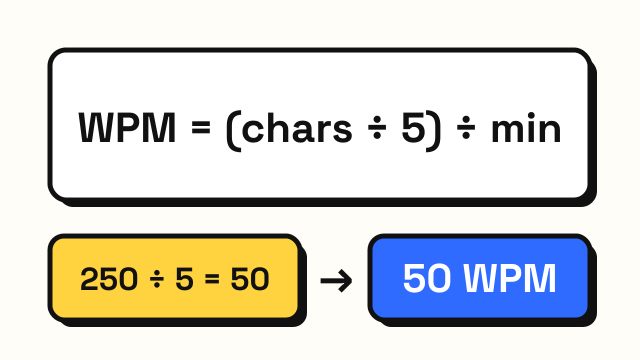
How is WPM calculated? Words per minute sounds simple, but "word" does not mean what you might expect. Typing tests count a word as five characters, including spaces and punctuation, so that a test full of long words and a test full of short words can be compared fairly. This guide explains that rule, the difference between net and raw WPM, how accuracy and keystrokes per hour are worked out, and the exact formulas used on this site.
The standard word: five characters
Real words vary in length. "I" is one letter and "responsibility" is fourteen. If a test counted actual words, typing "a an to it is" would score far higher than typing "important relationship" even though it takes fewer keystrokes.
To avoid that, typing tests use a standard word of five characters. Every character counts, including:
- letters
- spaces between words
- punctuation such as commas and periods
- numbers and symbols
So the phrase "the cat sat." (twelve characters, counting spaces and the period) counts as 12 ÷ 5 = 2.4 words, regardless of how many real words it contains. This convention has been used in typing instruction and testing for decades, which is why WPM scores from different sites are at least roughly comparable.
How WPM is calculated, step by step
The basic formula is:
WPM = (characters ÷ 5) ÷ minutes
For example, if you type 250 characters in one minute, that is 250 ÷ 5 = 50 words, divided by 1 minute = 50 WPM. If you type 600 characters in two minutes, that is 120 words ÷ 2 = 60 WPM.
The question every test has to answer is which characters to count. That is where net and raw WPM differ.
Net WPM vs raw (gross) WPM
Raw WPM (also called gross WPM) counts every character you typed, right or wrong. It measures how fast your fingers moved.
Net WPM counts only the correct characters. It measures how much usable text you produced. When a site shows a single "WPM" number, it is usually some form of net WPM.
Some older tests calculate net WPM differently, by starting from gross WPM and subtracting a penalty for each uncorrected error per minute. The idea is the same: mistakes lower your score. Because different tests use different methods, the same person can get slightly different numbers on different sites.
The gap between your raw and net WPM tells you a lot. If raw is 70 and net is 55, you are moving fast but losing about a fifth of your output to errors. Slowing down a little would probably raise your net WPM.
How accuracy is calculated
Accuracy is the share of your keystrokes that were correct at the moment you pressed them:
Accuracy = correct keystrokes ÷ all keystrokes × 100
This matters because of how corrections are counted. Suppose you type "teh", notice it, press Backspace twice and fix it to "the". The final text is correct, but you made one wrong keystroke along the way. On this site that mistake still counts against your accuracy. The reasoning is simple: you had to spend time noticing and fixing it, and in real work that time is lost.
What is KPH (keystrokes per hour)?
Some jobs, especially data entry, measure speed in keystrokes per hour (KPH) instead of WPM. KPH counts individual key presses, which makes more sense for numbers and codes than for prose.
KPH = keystrokes per minute × 60
If you make 300 keystrokes in one minute, that is 300 × 60 = 18,000 KPH. Because a standard word is five characters, you can convert roughly: raw WPM × 5 × 60 = KPH, so 60 raw WPM is about 18,000 KPH.
The formulas used on EnjoyTyping
The typing test on this site shows four numbers after each run:
| Metric | Formula | What it tells you |
|---|---|---|
| WPM | correct characters ÷ 5 ÷ minutes | Useful output, your main score |
| Raw WPM | all typed characters ÷ 5 ÷ minutes | How fast your fingers moved |
| Accuracy | correct keystrokes ÷ all keystrokes | How often you hit the right key first time |
| KPH | keystrokes per minute × 60 | Speed in data-entry terms |
"Correct characters" means the characters in your finished text that match the target. "All typed characters" means every character keystroke, including ones you later deleted. Minutes are measured from your first keystroke, not from when the page loaded, so you can read the first line before starting.
Worked example
Say you take a one-minute test and:
- make 280 character keystrokes in total
- 266 of them are correct when pressed, and 14 are wrong
- after fixing some mistakes, your final text has 260 correct characters
Then:
- WPM = 260 ÷ 5 ÷ 1 = 52
- Raw WPM = 280 ÷ 5 ÷ 1 = 56
- Accuracy = 266 ÷ 280 = 95%
- KPH = 280 × 60 = 16,800
Four raw WPM were lost to errors and corrections. Cutting those 14 wrong keystrokes in half would move WPM closer to raw WPM without typing any faster.
Why your score can differ between sites
If you score 55 WPM here and 62 somewhere else, it does not mean either site is broken. Common reasons for differences:
- Word lists. Short common words are faster than long or unusual ones.
- Net vs raw. Some sites show gross WPM as the headline number.
- Error handling. Some tests stop you until you fix a mistake, others let you continue.
- Timing. Some start the clock at page load, others at the first keystroke.
Compare yourself on the same test over time rather than across sites. For context on what different scores mean, see the guide to average typing speed, and if you want to raise your number, read how to type faster.
Frequently asked questions
Why is a word five characters in typing tests?
Five characters, including spaces, is the standard used to make results comparable. It roughly matches the length of an average English word plus the space after it, and it stops short words from inflating scores.
Do spaces count in WPM?
Yes. Spaces are characters and count toward the five-character word, as do punctuation marks and numbers.
What is the difference between WPM and raw WPM?
WPM counts only correct characters. Raw WPM counts every character you typed, including mistakes. The gap between them shows how much speed you lose to errors.
Why did my accuracy drop even though I fixed my mistakes?
Accuracy counts each keystroke when you press it. A wrong key you later fix with Backspace was still a wrong keystroke, so it lowers accuracy even though the final text is correct.