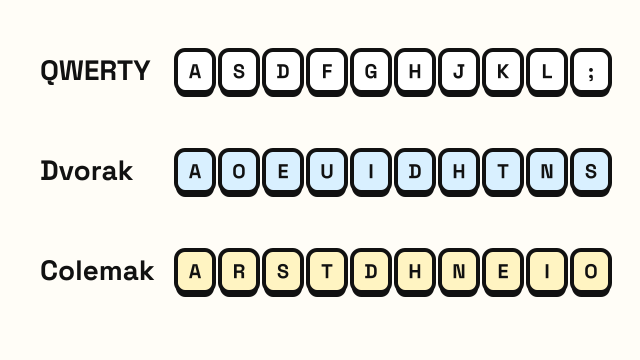
QWERTY vs Dvorak vs Colemak is one of the oldest debates in typing. QWERTY is the layout on almost every keyboard sold in English-speaking countries. Dvorak and Colemak are alternatives designed to move the most common letters under your fingers. This guide compares the three honestly: where they came from, how they differ, what switching actually costs, and who is likely to benefit.
A short history of each layout
QWERTY comes from the typewriter. It was developed by Christopher Latham Sholes in the 1870s and appeared on the Sholes and Glidden typewriter, which Remington began manufacturing in 1874. A popular story says the layout was designed to slow typists down so the mechanical arms would not jam. Historians still argue about the exact reasons for its arrangement, but it is clear that the layout was shaped by typewriter mechanics and early commercial use, not by a study of finger efficiency. It became the standard because typewriters, typists and training courses all settled on it, and computers inherited it.
Dvorak, full name Dvorak Simplified Keyboard, was designed by August Dvorak and his brother-in-law William Dealey and patented in 1936. It puts all five vowels on the left home row and the most common consonants on the right home row, so that typing tends to alternate between hands.
Colemak was created by Shai Coleman and released in 2006. It takes a different approach: instead of starting from scratch, it keeps many QWERTY keys where they are and moves the rest to put common letters on the home row. The shortcut keys Z, X, C and V stay in place.
Home rows side by side
The home row is where your fingers rest, so it says a lot about each layout's design.
| Layout | Left home keys | Right home keys |
|---|---|---|
| QWERTY | A S D F | J K L ; |
| Dvorak | A O E U | H T N S |
| Colemak | A R S T | N E I O |
On QWERTY, several of the most frequent English letters, such as E, T, O, I and N, are not on the home row, so your fingers leave it constantly. Dvorak and Colemak both place most of those letters where your fingers already rest.
How the three layouts compare
| QWERTY | Dvorak | Colemak | |
|---|---|---|---|
| Designed for | Typewriters (1870s) | Typing efficiency (1930s) | Efficiency with easy switching (2006) |
| Keys changed from QWERTY | None | Nearly all letter keys and most punctuation | 17 keys |
| Common letters on the home row | Few | Many | Many |
| Z X C V shortcuts in place | Yes | No | Yes |
| Built into Windows, macOS and Linux | Yes | Yes | macOS and Linux; Windows usually needs an installer |
| Printed on keyboards you can buy | Almost all | Rare | Rare |
| Supported on shared or public computers | Always | Sometimes | Rarely |
Is Dvorak or Colemak faster?
This is where claims often go further than the evidence. What is well established is that Dvorak and Colemak require less finger travel for English text, because more of the typing happens on the home row. Many people who switch also report that typing feels more comfortable.
Whether that translates into a higher WPM is less clear. Top speeds have been recorded on all three layouts, and plenty of the fastest typists in the world use QWERTY. Your speed depends much more on technique and practice than on the layout itself. A careful QWERTY touch typist will outpace a casual Dvorak user every time.
So a fair summary is: alternative layouts may make typing more comfortable and reduce strain for some people, but they are not a shortcut to speed.
What switching really costs
If you already touch type on QWERTY, switching means starting nearly from zero:
- A long slow period. Expect to type far below your old speed for weeks. Getting back to your old speed can take months of regular practice.
- Interference. Many switchers find it hard to keep both layouts in their fingers. Using a QWERTY computer at work while practicing Dvorak at home can slow down both.
- Shortcuts. On Dvorak, Ctrl+C, Ctrl+V, Ctrl+X and Ctrl+Z move to new places. Colemak avoids this by leaving those keys alone.
- Other people's computers. Every shared machine, phone and kiosk you use will still be QWERTY.
Colemak's design is aimed squarely at the switching problem. Because fewer keys move and the shortcuts stay put, many people find it easier to learn than Dvorak.
Who should consider switching?
Switching might be worth it if:
- you type many hours a day and want to reduce finger movement for comfort
- you do not yet touch type and are starting fresh anyway
- you type mainly on your own computer and rarely use others
- you enjoy learning for its own sake
Staying on QWERTY makes more sense if:
- you already touch type at a speed you are happy with
- you switch between many computers, including ones you cannot configure
- your main goal is a higher WPM for a job test, which will almost always be on QWERTY
If you have never learned to touch type, the biggest improvement comes from learning ten-finger typing at all, whatever the layout. The touch typing finger chart and how to type faster are good places to start.
How to try another layout
You do not need a new keyboard. Every major operating system lets you change the layout in its keyboard or language settings. The letters printed on your keys will not match, which is actually good practice for not looking down. Some people use stickers or blank keycaps.
Not sure which layout your computer is currently using? Press a few letter keys in the keyboard tester. It detects QWERTY, AZERTY, QWERTZ, Dvorak and Colemak from the keys you press.
Note that the typing lessons on this site teach the QWERTY layout, since that is what most people type on.
Frequently asked questions
Is Dvorak better than QWERTY?
Dvorak needs less finger movement for English text, and some people find it more comfortable. It has not been clearly shown to make typists faster, and switching takes a long time. For most people QWERTY with good technique is enough.
Is Colemak easier to learn than Dvorak?
For people who already know QWERTY, usually yes. Colemak changes fewer keys and keeps common shortcuts like copy and paste in the same place.
Can I use Dvorak or Colemak on a normal keyboard?
Yes. The layout is a software setting. You can switch any standard keyboard to Dvorak or Colemak in your operating system's settings.
Why is QWERTY still the standard?
QWERTY was already established on typewriters before computers existed. Keyboards, training materials and typists all used it, so it carried over, and the cost of changing everyone has kept it in place.