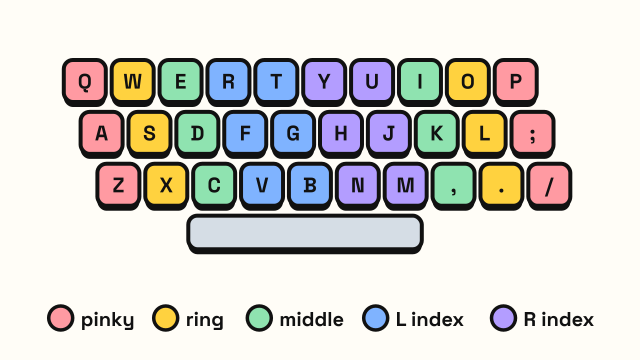
A touch typing finger chart shows which finger is responsible for each key on the keyboard. Once every key has a fixed owner, your hands stop guessing, your fingers travel less, and you can type without looking down. This guide gives the standard assignments for a US QWERTY keyboard, row by row, along with the reasoning behind them and the spots where people most often use the wrong finger.
How the finger zones work
Touch typing divides the keyboard into diagonal columns. Each finger owns one column, and the two index fingers each own two because they are the strongest and most flexible. The columns slant slightly to the left as they go down, which matches the staggered layout of a standard keyboard.
Everything starts from the home row. Your fingers rest here and return here after each keystroke:
| Hand | Pinky | Ring | Middle | Index |
|---|---|---|---|---|
| Left | A | S | D | F |
| Right | ; | L | K | J |
Your thumbs rest on the space bar. The small raised bumps on F and J let you find this position by feel. If the home row is new to you, the guide to home row keys covers it in more detail.
Touch typing finger chart by finger
This is the complete list of keys each finger covers on a US QWERTY keyboard.
| Finger | Keys |
|---|---|
| Left pinky | Q, A, Z, 1, backtick (`), Tab, Caps Lock, left Shift |
| Left ring | W, S, X, 2 |
| Left middle | E, D, C, 3 |
| Left index | R, F, V, T, G, B, 4, 5 |
| Right index | Y, H, N, U, J, M, 6, 7 |
| Right middle | I, K, comma (,), 8 |
| Right ring | O, L, period (.), 9 |
| Right pinky | P, ;, /, 0, -, =, [, ], \, ', Enter, Backspace, right Shift |
| Both thumbs | Space |
Some typists move 6 to the left index finger, because it sits almost exactly between the two hands on many keyboards. Either choice is fine as long as you are consistent.
Finger chart by keyboard row
Many people find it easier to learn one row at a time. The tables below show the same assignments organized by row.
Number row
| Key | ` | 1 | 2 | 3 | 4 | 5 | 6 | 7 | 8 | 9 | 0 | - | = | Backspace |
|---|---|---|---|---|---|---|---|---|---|---|---|---|---|---|
| Finger | L pinky | L pinky | L ring | L middle | L index | L index | R index | R index | R middle | R ring | R pinky | R pinky | R pinky | R pinky |
Top row
| Key | Tab | Q | W | E | R | T | Y | U | I | O | P | [ | ] | \ |
|---|---|---|---|---|---|---|---|---|---|---|---|---|---|---|
| Finger | L pinky | L pinky | L ring | L middle | L index | L index | R index | R index | R middle | R ring | R pinky | R pinky | R pinky | R pinky |
Home row
| Key | Caps Lock | A | S | D | F | G | H | J | K | L | ; | ' | Enter |
|---|---|---|---|---|---|---|---|---|---|---|---|---|---|
| Finger | L pinky | L pinky | L ring | L middle | L index | L index | R index | R index | R middle | R ring | R pinky | R pinky | R pinky |
Bottom row
| Key | L Shift | Z | X | C | V | B | N | M | , | . | / | R Shift |
|---|---|---|---|---|---|---|---|---|---|---|---|---|
| Finger | L pinky | L pinky | L ring | L middle | L index | L index | R index | R index | R middle | R ring | R pinky | R pinky |
Space bar
Space is pressed with a thumb. Most people use the thumb of their dominant hand, but some alternate. The important part is that the thumb stays hovering over the space bar so you never have to look for it.
The Shift rule: use the opposite hand
To type a capital letter or a shifted symbol, hold Shift with the pinky of the other hand, then press the key. For a capital F (left index), hold right Shift with your right pinky. For a capital J (right index), hold left Shift with your left pinky.
This keeps one hand free to press the letter while the other holds Shift, instead of twisting a single hand into an awkward stretch. It feels clumsy for a few days and then becomes automatic. The capital letters and punctuation lesson practices it directly.
Keys people most often press with the wrong finger
- B. It belongs to the left index finger, but many people reach for it with the right. On a standard keyboard, B is closer to the left index finger's home position.
- Y and 6. These are a long reach for the right index finger, so people sometimes use the left. Stick with the right index for Y.
- C. Should be the left middle finger. Self-taught typists often hit it with the index finger.
- P, semicolon and the keys to the right. The right pinky has a lot of territory. It feels weak at first, but it gets stronger with practice.
- Backspace. Reach with the right pinky and return to the home row. Moving the whole hand to Backspace pulls you out of position.
How to memorize the chart
Reading a chart is not the same as knowing it. Your fingers need the repetition. A good order is:
- Home row only, until you can type A S D F J K L ; without looking.
- Add the top row, one pair of keys at a time.
- Add the bottom row the same way.
- Add Shift, then numbers and symbols.
This is the order used in the free typing lessons, which show a finger path animation for every new key so you can see the movement before you make it. Once the letters feel natural, check yourself with a short typing test and look at which keys you miss most.
Frequently asked questions
Which finger should press the B key?
The left index finger. B sits in the left index finger's column on a standard QWERTY keyboard, even though it is close to the middle.
Which finger presses the space bar?
Either thumb. Many people use the thumb of their dominant hand. Pick one and use it consistently until it becomes automatic.
Is the finger chart the same on a laptop?
Yes. Laptop keys may be smaller or flatter, but the positions of the letter keys are the same, so the finger assignments do not change.
Do I have to follow the chart exactly?
Small, consistent changes are fine, such as pressing 6 with the left index finger. What matters is that each key always gets the same finger, so your hands can learn the movements.