How long does it take to learn touch typing? The honest answer is that it happens in stages. Learning where every key is can take a few weeks of short daily practice. Getting back to the speed you had as a "hunt and peck" typist usually takes a bit longer. Building real speed, 50, 60 WPM and beyond, is an ongoing process measured in months. This guide breaks down each stage, what affects how fast you move through it, and how to plan your practice.
The time ranges below are rough, commonly quoted estimates for someone practicing a little every day. They are not guarantees, and plenty of people move faster or slower.
The stages of learning touch typing
| Stage | What you're doing | Rough time with daily practice |
|---|---|---|
| 1. Learn the key positions | Home row, then top row, bottom row, capitals, numbers | About 2–4 weeks |
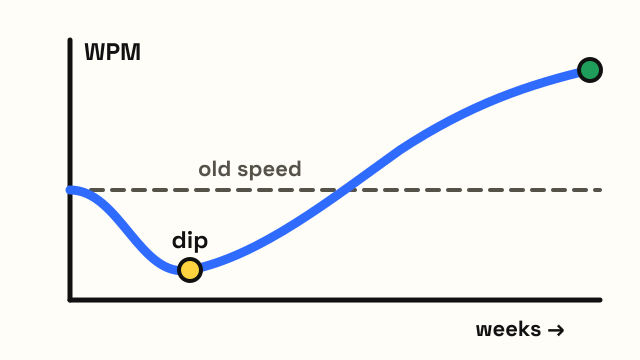
| 2. The slow dip | Typing without looking, slower than your old method | Overlaps with stage 1, often lasts 1–3 weeks |
| 3. Back to your old speed | Touch typing feels normal for everyday text | Often 1–2 months from the start |
| 4. Building speed | Pushing from 40 toward 60+ WPM | Several months, and it keeps improving |
Stage 1: learning where the keys are
This is the part most people mean when they ask how long touch typing takes. You learn each finger's keys, one small group at a time, until you can find every letter without looking. With 15–20 minutes a day, many people can cover the letter keys in two or three weeks. Numbers and symbols take a little longer because they are farther from the home row and used less often.
The EnjoyTyping typing lessons follow this order in six courses: home row, top row, bottom row, capitals and punctuation, numbers and symbols, then speed drills. Each course is split into short levels with a clear pass mark, so you know when you're ready to move on.
Stage 2: the slow dip
Almost everyone who switches from looking at the keyboard to touch typing gets slower at first. If you typed 35 WPM with two fingers, you might drop to 10–15 WPM when you stop looking. This is the stage where people quit, so it helps to expect it. The dip is a sign you're building a new habit, not a sign you're bad at it.
A practical way through it is to touch type during practice sessions and let yourself type the old way when you're under deadline. As practice sessions add up, switch more and more of your everyday typing over.
Stage 3: back to your old speed
At some point touch typing matches your old speed, and then passes it. For many learners, this happens within one to two months of steady practice. From here on, touch typing is simply how you type, and every email adds to your practice.
Stage 4: building speed
Speed grows with use. Going from 40 to 60 WPM usually takes months rather than weeks, and each further step gets slower. For context on where different speeds sit, see average typing speed.
What changes how long it takes
How often you practice. Short daily sessions work better than long weekly ones. Fifteen minutes every day adds up to more progress than two hours on a Sunday, because skills like this settle in between sessions.
How strictly you avoid looking. Every time you glance down, you reinforce the old habit. Covering your hands or using the on-screen keyboard guide instead of the real keys speeds things up. The guide on how to stop looking at the keyboard has specific techniques.
Accuracy first. People who race through lessons with lots of errors often plateau early and need to relearn keys later. Hitting a high accuracy target, around 95%, before chasing speed saves time overall.
Your starting habits. Someone who has never typed much has nothing to unlearn. Someone who has typed quickly with six fingers for years may find the switch harder, because the old pattern is strong. Both can learn; the second group just needs more patience during the dip.
Age and keyboard use. Children often pick up key positions quickly but have less stamina. Adults usually have more patience for structured drills. Neither group is locked out.
A sample four-week plan
This is one reasonable way to structure the first month with about 15–20 minutes a day. Adjust it to your pace.
| Week | Focus | Goal before moving on |
|---|---|---|
| 1 | Home row: ASDF JKL; plus G and H | 95% accuracy, about 10 WPM |
| 2 | Top row | 95% accuracy, about 15 WPM |
| 3 | Bottom row and common words | 95% accuracy, about 20 WPM |
| 4 | Capitals and punctuation, full sentences | 95% accuracy, about 25 WPM |
Those accuracy and speed targets match the pass criteria of each lesson level on this site. After week four, move on to numbers and symbols and then speed drills, and start taking a weekly typing test to track progress. Testing every day isn't necessary; once a week gives a clearer trend.
How to tell you've "learned" touch typing
There isn't an official finish line, but these are good signs:
- You can type a full sentence, including capitals and punctuation, without looking down.
- When you make a mistake, you feel it in your fingers before you see it on screen.
- Your touch typing speed is equal to or higher than your old speed.
- You no longer think about which finger to use for common letters.
Numbers and rare symbols often lag behind. It's normal to still think briefly about the % or ^ key long after letters feel automatic.
Frequently asked questions
Can I learn touch typing in a week?
You can learn the positions of the home row and top row in a week with daily practice, and some people cover all the letters. Being comfortable and fast without looking usually takes several weeks more.
How many hours does it take to learn touch typing?
It varies a lot, so any single number would be a guess. Thinking in days of practice is more useful: a few weeks of 15–20 minutes a day covers the keys for most learners, and speed keeps improving with regular use after that.
Why did my typing speed drop when I started touch typing?
Because you replaced a familiar habit with a new one. The drop is temporary. Keep your accuracy high and your speed will return and then pass your old level.
Is it worth learning touch typing as an adult?
For most people who type regularly, yes. The time investment is a few weeks of short practice, and the benefit is faster, more comfortable typing with your eyes on the screen instead of the keys.