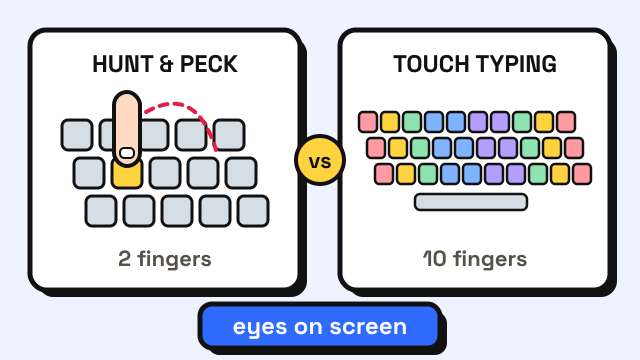
Hunt and peck means finding each key by looking at the keyboard and pressing it with one or two fingers. Touch typing means every finger has its own keys, your hands rest on the home row and your eyes stay on the screen. For most people who type every day, switching to touch typing is worth it: the main gain is not raw speed but being able to watch your text while you type. The cost is a few weeks of being slower than you are now. This guide explains what the research says, what the switch actually costs and how to get through it.
What is the difference between hunt and peck and touch typing?
The two styles differ in where your eyes go and how your fingers find the keys.
| Hunt and peck | Touch typing | |
|---|---|---|
| Fingers used | Usually 1–2 per hand, sometimes more | All ten (thumbs on Space) |
| How you find keys | Look down, then press | Memorized reach from the home row |
| Where your eyes are | Mostly on the keyboard | On the screen or source text |
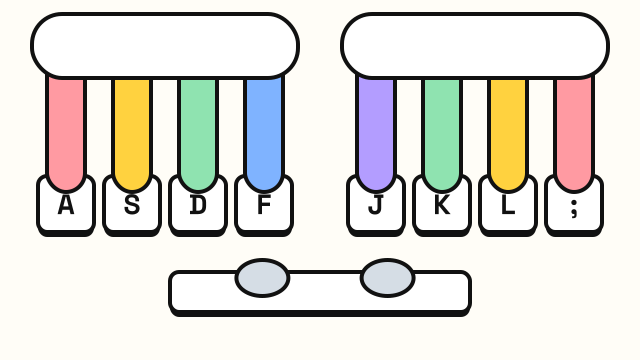
| Hand position | Moves across the keyboard | Stays anchored on A S D F and J K L ; |
| Finger for each key | Often whichever is closest | Always the same finger |
| Learning time | None, you pick it up by using a keyboard | A few weeks of practice for the keys |
Many people sit in between: four to six fingers, glancing down for some keys and knowing others by feel. Researchers call this "self-taught" typing.
Can hunt and peck typists be fast?
Some can, and this is the honest part of the comparison. A 2016 motion-capture study at Aalto University tracked 30 everyday typists. It found that self-taught typists who used fewer fingers, often around six, could reach speed and accuracy comparable to people who had taken a touch typing course (Feit, Weir and Oulasvirta, 2016; Aalto University).
What predicted speed was not the number of fingers. The fast typists in that study shared three habits:
- The same finger for the same letter, every time.
- Preparing the next keystroke before the current one finished.
- Little hand movement, keeping the hands roughly in one place.
Touch typing builds exactly these habits on purpose. A self-taught typist who stumbled into them can be fast; one who didn't usually stalls.
Why touch typing still wins for most people
The same study found the biggest difference was in the eyes. Self-taught typists spent about twice as much time looking at their fingers as touch typists did (Aalto University, 2016). That matters more than it sounds:
- You catch errors late. If you are watching the keys, a typo shows up on screen several letters before you see it. Our guide on how to improve typing accuracy covers why that is expensive.
- Your ceiling is lower. A larger study of 136 million keystrokes found that the fastest typists pressed the next key before releasing the previous one on 40–70% of keystrokes (Aalto University, 2018). That kind of overlap is hard when one finger has to travel across the board for every letter. The researchers' advice included learning to type without looking at your fingers and using different fingers for successive letters.
Note that over 70% of the volunteers in that larger study had taken a touch typing class. The research says the habits behind touch typing make people fast, however they got them.
Is it worth switching? A quick self-check
Not everyone needs to switch. Use this as a rough guide.
| Your situation | Worth switching? |
|---|---|
| Under about 30 WPM and you look down for most keys | Yes, you have the most to gain |
| 30–50 WPM, six or so fingers, still glance down often | Probably, mainly for accuracy and eyes on screen |
| 50+ WPM, rarely look down, same finger for each key | Optional; fix weak keys instead of relearning everything |
| You type a few lines a week | Low priority, but lessons still help |
| Your job has a typing test coming within days | Wait until after the test, then switch |
To find your number, take the 1 minute typing test three times and use the middle result. If you are not sure where that sits, the average typing speed guide lists commonly cited ranges.
What does switching cost?
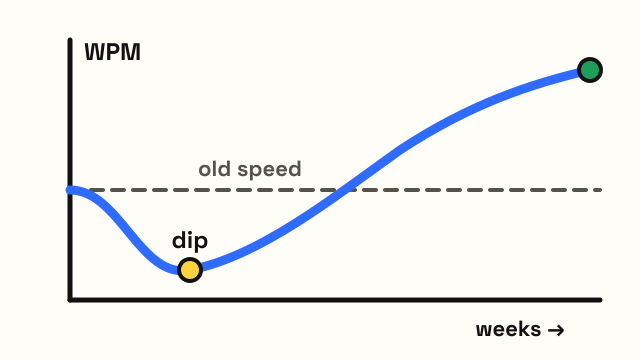
The cost is a temporary slowdown. When you stop looking at the keys, your speed drops, often to half your old number or lower, because your fingers have not learned the reaches yet. This dip is where most people give up.
Commonly quoted timelines for someone practicing 15–20 minutes a day look like this. They are rough estimates, not guarantees.
| Stage | What happens | Rough time |
|---|---|---|
| Learning the keys | Home row, then top and bottom rows | About 2–4 weeks |
| The dip | Slower than your hunt and peck speed | Overlaps with the first weeks |
| Back to your old speed | Touch typing feels normal | Often 1–2 months from the start |
| Passing your old speed | Steady gains with everyday use | Months, and it keeps improving |
The guide on how long it takes to learn touch typing goes through each stage in more detail.
How to switch from hunt and peck to touch typing
1. Learn the home row first
Rest your left fingers on A S D F and your right on J K L ;, with thumbs on Space. Find the bumps on F and J without looking. Start with the home row lessons and read home row keys if the position feels strange.
2. Give every key one finger
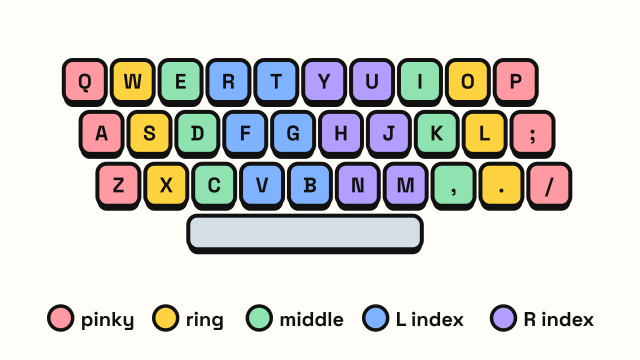
Use the touch typing finger chart and stick to it, even for keys where your old finger feels easier. Consistent mapping is the habit the research links most clearly to speed.
3. Stop looking, even when it hurts
Cover your hands with a cloth or a sheet of paper during practice. Watch the on-screen keyboard guide instead of the real keys. How to stop looking at the keyboard has more tricks.
4. Aim for accuracy, not speed
Hold yourself to around 95% accuracy before speeding up. Fast, sloppy practice trains the wrong reaches.
5. Practice short and often
Fifteen minutes a day beats two hours once a week. Work through the typing lessons in order: home row, top row, bottom row, then capitals, numbers and symbols.
6. Use the old style only when you must
During the dip, touch type in practice and in low-pressure typing like chat, and let yourself peck when a deadline is close. Move more of your daily typing over as the new style catches up.
7. Add games once the keys stick
Games keep practice fun once the letters stick. Typing Race rewards clean typing, and the Typing Challenge speeds up every 30 seconds.
Frequently asked questions
Is hunt and peck bad for you?
It is not harmful in itself, but looking down for long periods can encourage a bent neck. More often the problem is speed and accuracy: you catch errors late and spend time moving your eyes between screen and keys. See typing posture for setup tips.
How fast can a hunt and peck typist get?
It varies a lot. Pure two-finger pecking usually stays well below average, while self-taught typists who use several fingers consistently can match trained typists, as the 2016 Aalto study found.
I'm already at 50 WPM with six fingers. Should I relearn?
Not necessarily. If you rarely look down and use the same finger for each key, you already have the habits that matter. Work on the keys you miss most and any reaches where you still glance down.
How long until touch typing is faster than my old style?
For many people it takes one to two months of short daily practice to get back to their old speed, then they keep improving past it. People with a fast, ingrained old style often take longer.
Sources
- Feit, A. M., Weir, D. and Oulasvirta, A. (2016). How We Type: Movement Strategies and Performance in Everyday Typing. Proceedings of the 2016 CHI Conference on Human Factors in Computing Systems.
- Aalto University. Ten fingers not needed for fast typing (2016).
- Dhakal, V., Feit, A. M., Kristensson, P. O. and Oulasvirta, A. (2018). Observations on Typing from 136 Million Keystrokes. Proceedings of CHI 2018.
- Aalto University. The traits of fast typists discovered by analysing 136 million keystrokes (2018).