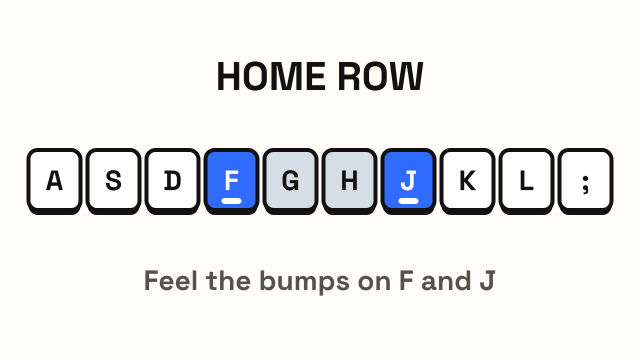
The home row keys are the middle row of letter keys where your fingers rest when you touch type. On a standard QWERTY keyboard, your left hand sits on A S D F and your right hand sits on J K L ;, with your thumbs over the space bar. Every other key is reached from this position, and your fingers return here after each keystroke. Learning the home row is the first real step toward typing without looking.
What are the home row keys?
The home row is the row that starts with Caps Lock on the left and ends with Enter on the right. Eight of its keys are "home keys", one for each finger apart from the thumbs:
| Finger | Left hand | Right hand |
|---|---|---|
| Pinky | A | ; (semicolon) |
| Ring | S | L |
| Middle | D | K |
| Index | F | J |
The two keys in the middle of the row, G and H, are also on the home row but are not resting positions. Your index fingers reach sideways to press them: G with the left index finger and H with the right. The apostrophe key (') to the right of the semicolon is reached with the right pinky.
Why the F and J keys have bumps
Look closely at F and J on almost any keyboard and you will see a small raised line or dot. These bumps let you find the home row by touch alone. Rest your index fingers on the bumps and the other fingers fall into place next to them.
This is what makes touch typing possible. If you had to look down to find your starting position, you would lose your place in the text each time. With the bumps, you can reset your hands in a fraction of a second without taking your eyes off the screen.
Why the home row matters
Starting from the home row keeps every key within a short reach. From A S D F and J K L ;, each finger moves up one row, down one row, or stays put for most letters. Your index fingers also cover the center columns (T, G, B on the left and Y, H, N on the right).
The benefits add up:
- Less movement. Short reaches are faster than moving your hand across the keyboard.
- Consistency. Starting from the same place every time means each key is always the same movement away, so your fingers can learn it.
- No looking. A fixed home position is what lets you type by feel.
Several very common English letters sit on the home row, including A, S, D, H and L. You can type words like "flask", "salad", "glass" and "half" without leaving it.
How to place your hands correctly
- Find the bumps on F and J with your index fingers.
- Let your middle, ring and pinky fingers rest on D S A (left) and K L ; (right).
- Curve your fingers slightly, as if lightly holding a ball. Rest the fingertips, not the flat pads.
- Let your thumbs hover over the space bar.
- Keep your wrists straight and slightly raised. Do not rest them heavily on the desk while typing.
The fingers should touch the keys lightly without pressing them. After you press any key, bring that finger back to its home key. At first this feels deliberate. With practice it happens without thinking.
For how your body, chair and screen should be arranged around this hand position, see the guide to proper typing posture.
Common home row mistakes
- Resting on the wrong keys. If your right index finger lands on H instead of J, every letter on that hand will be off by one. Always check for the bump.
- Flat fingers. Straight, flat fingers are slower and reach less well than curved ones.
- Drifting. Hands tend to wander during a long sentence. Touch the bumps again at the start of each line.
- Pressing G or H with the wrong hand. G belongs to the left index finger and H to the right.
- Anchoring the pinky. Some people keep a pinky pressed down on A or ; all the time. Rest it lightly instead so it stays free to move.
How to practice the home row
Practice works best in small steps. A common sequence is to learn one pair of keys, one on each hand, at a time:
- F and J (index fingers)
- D and K (middle fingers)
- S and L (ring fingers)
- A and ; (pinkies)
- G and H (index fingers reaching inward)
- Short words using only home row letters
This is exactly how Course 1 of the typing lessons is structured. Each new key starts with an animation showing the finger's path from its home key, followed by drills, mixed practice with earlier keys and short words. A review step repeats the keys you missed. The level is passed at 95% accuracy and 10 WPM, which is a good sign that the home row is in your fingers and you are ready for the top row.
Once the home row feels natural, move on to the rest of the keyboard. The touch typing finger chart shows which finger covers every other key.
Is the home row the same on other layouts?
The idea of a home row exists on every layout, but the letters differ. On Dvorak, the left home keys are A O E U and the right are H T N S. On Colemak, they are A R S T and N E I O. Both layouts put more common letters on the home row than QWERTY does. The F and J bumps stay in the same physical place on the keyboard, but they sit on different letters depending on the layout you have chosen.
Frequently asked questions
What are the 8 home row keys?
On a QWERTY keyboard, the eight home keys are A, S, D and F for the left hand and J, K, L and semicolon for the right hand. Your thumbs rest on the space bar.
Why do F and J have bumps on the keyboard?
The bumps let you find the home row by touch, so you can place your index fingers correctly without looking down at the keyboard.
Which finger types G and H?
G is typed with the left index finger and H with the right index finger. Each index finger reaches one key toward the center, then returns to F or J.
How long does it take to learn the home row?
Most people can type the home row keys without looking after a few short practice sessions. Getting smooth and fast on them takes longer and continues as you learn the other rows.