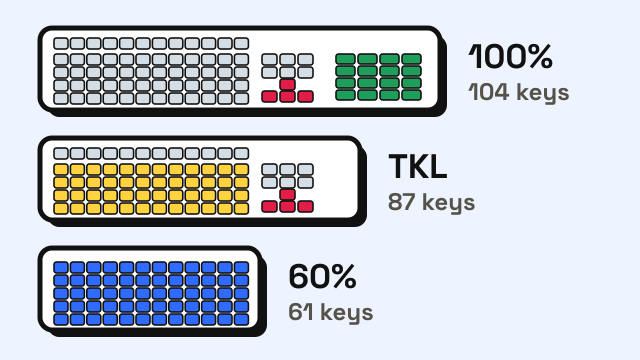
Keyboard sizes describe how much of a standard full-size keyboard is kept. A full-size board has about 104 keys, a tenkeyless (TKL) board drops the number pad and keeps about 87, a 75% board squeezes the function row and arrows into a tighter block of roughly 80–84 keys, a 65% board drops the function row but keeps the arrows, and a 60% board keeps only the main typing block, about 61 keys. The letter keys are in the same place on all of them, so the size mostly changes how you reach numbers, arrows and shortcuts, not how fast you type words. This guide compares the sizes, shows which keys each one gives up, and explains how to check a board you already own.
What do the keyboard size percentages mean?
The percentages are informal labels, not a standard. They roughly describe how much of a full-size keyboard is left. The Deskthority keyboard wiki points out that a typical 60% board, such as the KBC Poker, has 61 keys against 104 on a full-size ANSI board, which works out to about 59% of the keys. Other sizes are rounded the same loose way, and makers don't always agree on the names. The same wiki notes that "tenkeyless" has sometimes been used for 75% boards as well.
Key counts also shift by one depending on the layout standard. ISO boards, common in Europe, add a key between the left Shift and Z, so a full-size ISO board has 105 keys and an ISO TKL has 88.
Keyboard sizes compared
The table uses the key counts most often quoted for US (ANSI) boards. Individual models vary by a few keys.
| Size | Typical keys (ANSI) | Number pad | Function row (F1–F12) | Arrow keys | Home, End, Page Up/Down |
|---|---|---|---|---|---|
| Full-size (100%) | 104 | Yes | Yes | Yes | Yes, in a separate cluster |
| 96% / 1800 | about 96–100 | Yes, compressed | Yes | Yes | Some, squeezed in |
| TKL (80–87%) | 87 | No | Yes | Yes | Yes, in a separate cluster |
| 75% | about 80–84 | No | Yes | Yes | A few, in a column on the right |
| 65% | about 66–68 | No | No (Fn layer) | Yes | A few, in a column on the right |
| 60% | about 61 | No | No (Fn layer) | No (Fn layer) | No (Fn layer) |
"Fn layer" means the key is still there, but you hold a function key and press another key to get it. On many 60% boards, for example, Fn plus the number row gives F1–F12, and Fn plus a cluster of letter keys acts as the arrows.
Which keys do smaller keyboards remove?
Each step down removes one group of keys:
- TKL removes the number pad. Everything else stays where it is on a full-size board, which is why it's the easiest size to switch to.
- 75% keeps the function row and arrows but pushes everything together. The navigation keys move into a single column on the right, and the gaps between key groups disappear.
- 65% drops the function row. The number row becomes the top row, and F1–F12 move to an Fn layer.
- 60% also drops the arrow keys and the right-hand column. The Deskthority wiki notes that some 60% boards squeeze arrows in, but most leave them out and rely on Fn keys.
If you want to see which finger each key belongs to before you lose some of them, the touch typing finger chart shows the zones on the main block.
Does keyboard size affect typing speed?
For ordinary text, not much. The letters, number row, Space, Shift, Enter and Backspace sit in the same positions on every size in the table, so the motion your fingers make to type a sentence is the same on a 60% board as on a full-size one. We're not aware of any study showing that a smaller form factor changes words per minute on plain prose.
What does change is anything outside the main block:
- Editing. If you move the cursor with arrow keys, Home and End a lot, a 60% board turns each of those into a two-key chord. That's slower until the Fn layer becomes habit, and some people never get used to it.
- Numbers. Data entry with the number pad is a lot faster for many people than using the number row. If your work involves long strings of digits, losing the number pad matters. The guide on typing numbers faster covers both methods.
- Shortcuts. Shortcuts that use F-keys, such as F2 to rename or F5 to refresh, need an extra key on 65% and 60% boards. Our list of keyboard shortcuts for typing mostly uses Ctrl combinations, which work the same on any size.
Any new keyboard, of any size, can lower your score for the first few days simply because the key feel and spacing between rows is slightly different. Take a 1-minute typing test on your old board, switch, then test again after a week of normal use. That gives you a fair comparison rather than a first-day impression.
Which keyboard size should you choose?
Start from what you actually press during a normal day:
| If you... | A good fit |
|---|---|
| Enter a lot of numbers, spreadsheets or accounting data | Full-size, or 96% to save some width |
| Want more desk space for the mouse but use every other key | TKL |
| Use F-keys and arrows often but want a compact board | 75% |
| Rarely use F-keys but edit text with the arrows | 65% |
| Mostly type prose or chat and want the smallest board | 60% |
| Are learning to touch type for the first time | Any size; TKL or full-size makes lessons simplest |
A smaller board also lets you keep the mouse closer to your body, so your shoulder isn't stretched out to the side. If that's the main reason you're shrinking, the typing posture guide explains how to set up the rest of the desk.
Laptop keyboards don't fit neatly into the percentages. Many are close to a 75% layout, with the function row and arrows kept and the number pad either missing or squeezed onto larger models.
How to check a keyboard's size and keys
If you aren't sure what you have, count the top rows: no number pad means TKL or smaller, no separate F-key row means 65% or 60%, and no arrow keys means 60%. To confirm that every key and every Fn-layer key works:
- Open the keyboard tester and pick the size that matches yours. It has Full-size, TKL, 60% and Mac options.
- Press every key once and check that it lights up.
- Hold Fn and press the keys that should produce arrows or F-keys. The tester shows the key code each one sends, so you can see whether the layer is working.
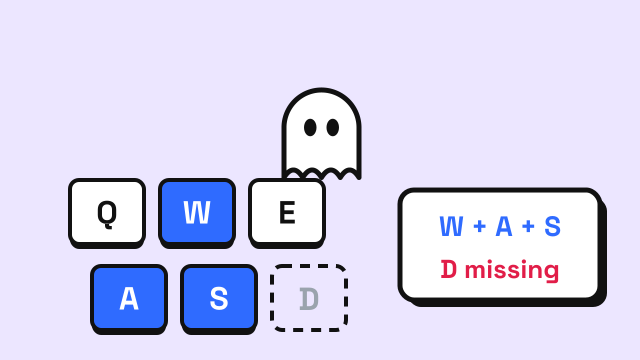
- Hold several keys at once to check for keyboard ghosting, which is a separate limit from size.
If a key never registers, the guide on keyboard keys not working walks through the usual fixes.
Frequently asked questions
Is a 60% keyboard good for typing?
Yes, for writing prose. All the letter keys and common punctuation are in their usual places. It's less comfortable for heavy editing, coding or number entry, because arrows, F-keys and navigation keys need the Fn key.
What is the difference between 75% and TKL?
Both keep the function row and arrow keys and drop the number pad. A TKL keeps the gaps between key groups and a full navigation cluster, while a 75% board pushes everything together and keeps only a few navigation keys in one column, which makes it narrower.
Is 65% better than 60%?
It depends on whether you use arrow keys. A 65% board is slightly wider but keeps dedicated arrows, which many people find easier for editing text. A 60% board is the smallest common size and puts the arrows on an Fn layer.
Do compact keyboards help with typing lessons?
The size doesn't change what you learn, because the typing lessons focus on the letter keys, home row and number row, which are the same on every size. A full-size or TKL board is simplest if a course later covers the number pad.
Sources
- Deskthority wiki. 60% (a typical 60% board such as the KBC Poker has 61 keys against 104 on full-size ANSI, about 59%; arrows usually omitted and reached through Fn keys).
- Deskthority wiki. ANSI vs ISO (104-key full-size and 87-key tenkeyless ANSI layouts; ISO adds a key beside the left Shift).
- Deskthority wiki. Tenkeyless keyboard (tenkeyless is the full-size layout without the number pad; the name is sometimes applied to 75% boards).