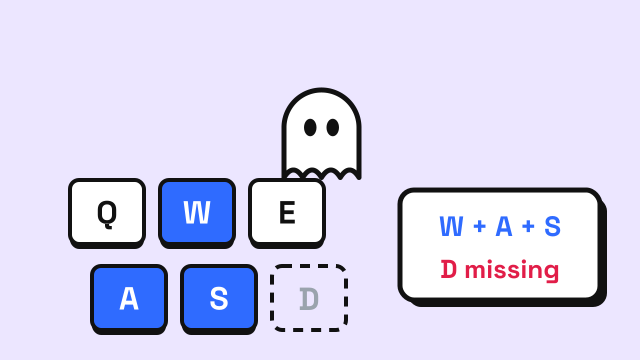
Keyboard ghosting is when you press several keys at the same time and one or more of them doesn't register. You hold W and Shift, press Space to jump, and nothing happens. Or you type fast and a letter goes missing from the middle of a word. The keyboard isn't broken; it's hitting a limit in how it detects keys. This guide explains why ghosting happens, what the terms "key rollover", "6KRO" and "NKRO" mean, and how to test your own keyboard.
What keyboard ghosting is
Strictly speaking, there are two related problems that people usually lump together as ghosting:
- Blocking (or jamming): you press a combination of keys and the keyboard ignores one of them. This is what most people experience.
- Ghosting in the original sense: the keyboard reports a key that you did not press, a "ghost" key. Many keyboards prevent this by deliberately blocking the combination, which is why blocking is so common.
For everyday purposes, both mean the same thing: some simultaneous key presses aren't reported correctly.
Why it happens: the key matrix
A keyboard doesn't have a separate wire for every key. That would require over a hundred connections to the controller chip. Instead, keys are arranged in a grid of rows and columns called a matrix. The controller checks the grid rapidly, row by row, and sees which columns are connected. Each key sits at one row-column crossing.
This works perfectly for one or two keys at a time. The trouble starts with certain combinations of three or more keys. If three keys form three corners of a rectangle in the matrix, electricity can flow through them in a way that makes the fourth corner look pressed as well. The controller can't tell whether that fourth key is really down.
Keyboard makers handle this in two ways:
- Block the ambiguous combination. Cheaper keyboards simply ignore the extra key. This prevents ghost keys but causes blocking.
- Add a diode to every switch. A diode lets current flow in only one direction, which removes the false paths. With a diode per key, the controller can read any combination correctly. Many mechanical and gaming keyboards do this.
Key rollover: 2KRO, 6KRO and NKRO
"Key rollover" (KRO) describes how many keys a keyboard can register at once. You'll see it written in a few forms:
| Term | Meaning | Where you'll find it |
|---|---|---|
| 2KRO | Any two keys are always detected; more may fail depending on the combination | Many basic office and laptop keyboards |
| 6KRO | Up to six regular keys at once, plus modifier keys such as Shift, Ctrl and Alt | Common on USB keyboards using the standard "boot" protocol |
| NKRO | N-key rollover: every key can be registered at once | Many mechanical and gaming keyboards |
The 6KRO figure comes from the standard USB keyboard report used by the "boot" protocol, which has room for six regular keys plus the modifiers. Keyboards that offer NKRO over USB use a different report format to get around this. Some let you toggle NKRO on and off, because a few older systems and BIOS screens only understand the standard six-key report.
It's also worth knowing that a keyboard's rollover is often not uniform. A 2KRO board might happily register five keys in one area and fail on three in another, depending on how its matrix is wired. That's why testing specific combinations matters more than the number on the box.
When ghosting actually matters
Gaming. Games often need several keys at once: movement keys, a modifier like Shift to sprint, Space to jump, plus an ability key. This is where blocking shows up most.
Two players on one keyboard. Local multiplayer games that split the keyboard between two people can easily exceed the limit.
Fast typing. When you type quickly, you often press the next key before releasing the previous one. That's normal and is called rollover typing. On most keyboards, even 2KRO handles ordinary typing, because you rarely hold more than two or three letter keys at once. But if a keyboard blocks common combinations, you may see dropped letters in fast bursts.
Keyboard shortcuts. Complex shortcuts with three modifiers and a key can hit blocking on some laptop keyboards.
How to test your keyboard for ghosting
You can check this in a minute with the EnjoyTyping keyboard tester:
- Open the tester and pick the layout that matches your keyboard.
- Hold down keys one at a time without releasing the earlier ones, for example A, S, D, F, then J, K, L.
- Each key turns yellow while you hold it. Any key you're holding that doesn't turn yellow is being blocked.
- Check the "Most keys at once" counter for the highest number your keyboard reported together.
- Try the combinations you actually use: your game's movement keys plus Shift and Space, or your most-used shortcuts.
If a key never registers at all, even alone, that's a different problem, such as a faulty switch or a driver issue, rather than ghosting.
What to do if your keyboard ghosts
- Change the key bindings. In games, moving an action to a different key can avoid a blocked combination.
- Check for an NKRO setting. Some keyboards switch rollover modes with a key combination or companion software. Check the manual.
- Try a different connection. A few keyboards support NKRO over a wired connection but less over wireless, or the other way around.
- Upgrade if it matters to you. If you game heavily or hit blocking during typing, a keyboard that lists NKRO or "anti-ghosting" on all keys removes the problem.
For typing practice specifically, most keyboards are fine. If you're curious whether dropped letters in a typing test are your fingers or your hardware, run the ghosting check first. And if you're choosing a keyboard partly for comfort, the typing posture guide covers how to set it up.
Frequently asked questions
Is keyboard ghosting a hardware problem?
It's a hardware limitation rather than a defect. It comes from how the keyboard's key matrix is wired and read. Keyboards with a diode on every key and NKRO support avoid it.
What does anti-ghosting mean on a keyboard box?
It usually means the keyboard handles more simultaneous keys than a basic board. Sometimes that applies to every key, and sometimes only to a gaming zone such as WASD. Look for "NKRO" or "full anti-ghosting" if you need all keys covered.
Do laptop keyboards have ghosting?
Many do, especially with three or more keys held at once. Laptop keyboards are built for typing and shortcuts, not for complex game inputs. An external keyboard is the usual fix.
Can ghosting cause typos when typing fast?
It can, but it's uncommon with ordinary typing. Most typos in fast typing come from finger timing. Testing your keyboard with the keys you tend to overlap will tell you which it is.