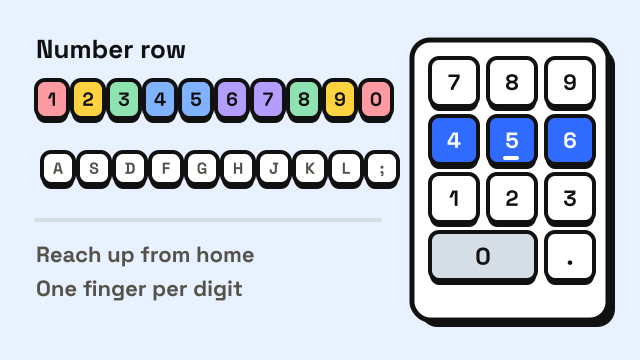
To type numbers faster, give every digit a fixed finger, reach for it from the home row without looking, and practice digits in small groups rather than one at a time. On the number row above the letters, that means the same fingers you already use for the letters below each digit. On a numeric keypad (the "10-key" pad on the right of a full-size keyboard), it means resting your right hand on 4, 5 and 6 and finding the 5 by its raised bump. This guide covers both, with drills and the speed targets that number-heavy jobs commonly use.
Why are numbers harder to type than letters?
Most people who type letters well still slow down on numbers. There are three common reasons:
- The reach is longer. The number row is two rows above the home row, so each digit is a bigger jump than any letter. Fingers that drift during the reach land on the key next door.
- Numbers carry no pattern. When you type "the", your fingers know the whole word as one movement. A string like 4719 has no familiar shape, so you type it key by key.
- People look down. Many typists who never look at the letters still glance at the number row, which breaks their place in the text. Our guide on how to stop looking at the keyboard applies to digits too.
Which finger types each number on the number row?
Each digit belongs to the finger that already owns the letter column below it. This is the same mapping shown in our touch typing finger chart.
| Digit | Finger | Reach from |
|---|---|---|
| 1 | Left pinky | A |
| 2 | Left ring | S |
| 3 | Left middle | D |
| 4, 5 | Left index | F |
| 6, 7 | Right index | J |
| 8 | Right middle | K |
| 9 | Right ring | L |
| 0 | Right pinky | ; |
Some typists press 6 with the left index finger because it sits close to the middle of the keyboard. That is fine. What matters is choosing one finger for each digit and sticking to it, so your hand stops having two plans for the same key.
Two tips make the reach more reliable:
- Keep the other fingers anchored. When your left middle finger goes up for 3, leave the index on F. The anchored finger tells your hand where home is when it comes back.
- Reach up and slightly left. On most keyboards the number row is shifted to the left of the letters beneath it, so 5 sits above the gap between R and T rather than directly above T. Aim a little left of where it feels like the key should be.
How do you type on a 10-key numeric keypad?
The numeric keypad uses the right hand only, and like the letter keys it has a home row. Put your fingers on 4, 5 and 6: index on 4, middle on 5, ring on 6. Your thumb rests on 0, and your pinky covers Enter and, on most keyboards, + and -.
| Key | Finger |
|---|---|
| 7, 4, 1 | Index |
| 8, 5, 2 | Middle |
| 9, 6, 3, decimal point | Ring |
| 0 | Thumb |
| Enter, +, - | Pinky |
| / and * | Middle and ring (some typists use the index for /) |
The 5 key usually has a small raised bar or dot, the same idea as the bumps on F and J. Feel for it whenever you lose your place, without looking down. A tactile 5 is not just a keyboard maker's habit: US federal accessibility rules for information technology require the 5 on a numeric keypad to be distinct by touch, so people can orient themselves without sight (US Access Board, 36 CFR 1194, section 407.3.3).
Two more things trip people up:
- The layout is upside down compared with a phone. Computer keypads and calculators put 7-8-9 on the top row, while phone keypads put 1-2-3 on top. The phone layout came out of human factors testing at Bell Labs in the late 1950s, which tested 18 key arrangements for speed, accuracy and preference before the phone layout was chosen (Deininger, 1960). If you switch between the two every day, expect a short adjustment each time.
- Num Lock must be on. With Num Lock off, the keypad acts as arrow keys, Home, End and Page Up/Down. If your digits suddenly move the cursor, press Num Lock. You can check that each keypad key registers in the keyboard tester by choosing the full-size view.
Many laptops have no keypad; a separate USB keypad gives you the same layout.
Number row or keypad: which is faster?
For long runs of pure numbers, such as invoice amounts or spreadsheet columns, the keypad is usually faster once learned. All ten digits sit under one hand with short reaches, leaving the other hand free for a mouse or paper.
For numbers mixed into text, like "Call me at 3 pm" or "Order 2 boxes", the number row is usually better. Moving your right hand to the keypad and back costs more time than the reach up from the home row.
| Situation | Better choice |
|---|---|
| Columns of figures, prices, IDs | Numeric keypad |
| Dates, times and quantities inside sentences | Number row |
| Laptop with no keypad | Number row, or an external keypad |
| Passwords and codes mixed with letters | Number row |
How fast should you type numbers?
Numeric speed is usually measured in keystrokes per hour (KPH), not words per minute, because numbers don't come in words. Every key press counts, including the decimal point and Enter. Our guide on how WPM is calculated shows how KPH relates to WPM: one keystroke per second is 3,600 KPH, and 60 raw WPM works out to about 18,000 KPH on ordinary text.
There is no official standard for numeric typing speed. Data entry listings and 10-key tests commonly ask for something in the range below, often with an accuracy requirement of 98% or more, because a wrong digit in a payment or an account number is costly.
| Numeric speed | What it usually means |
|---|---|
| Under 6,000 KPH | Still learning the keypad, often looking down |
| 6,000–8,000 KPH | Usable for occasional numeric work |
| 8,000–10,000 KPH | The range many data entry roles commonly ask for |
| 10,000–12,000 KPH | Fast, competitive for numeric-heavy jobs |
| 12,000+ KPH | Very fast, typical of experienced 10-key operators |
Each employer sets its own bar and its own test, so check the listing. For more on what these jobs look for, see typing speed for jobs and typing jobs from home.
How to practice typing numbers faster
Try this 10-minute routine each day:
- Two minutes of single reaches. From the home row, type each digit with its finger and return: 1 a 2 s 3 d and so on. On the keypad, go up and down each column: 7 4 1 4 7, 8 5 2 5 8, 9 6 3 6 9.
- Three minutes of pairs and triples. Type common groups like 10, 20, 50, 100, 2026, 365. Groups help your fingers learn short patterns, the same way they learned common letter pairs.
- Three minutes of real-looking data. Type phone numbers, dates, prices with decimals and postal codes. Keep your eyes on what you are copying.
- Two minutes of accuracy checking. Slow down and type a short list with no mistakes at all. Accuracy is the habit that matters most with numbers, as our guide on improving typing accuracy explains.
For the number row, Course 5: Numbers & Symbols in our typing lessons drills the digits and the symbols above them with a finger guide on screen. Once digits feel steady, the 3 minute typing test reports your keystrokes per hour along with WPM, so you can track the same unit employers use.
Frequently asked questions
What finger should press 6 on the number row?
Most finger charts give 6 to the right index finger, and some typists use the left index instead. Either works, as long as you always use the same one.
Why does my numeric keypad type arrows instead of numbers?
Num Lock is off. Press the Num Lock key (on some laptops it is combined with another key and needs Fn) and the keypad will type digits again.
What is a good 10-key speed?
Data entry roles commonly ask for about 8,000 to 10,000 keystrokes per hour, often with 98% accuracy or better. Above 12,000 KPH is considered very fast. Requirements vary by employer.
How long does it take to learn the 10-key pad?
It depends on practice time. The keypad has few keys under one hand, so many people learn it faster than the full keyboard.
Sources
- US Access Board. ICT Standards and Guidelines, 36 CFR Part 1194, section 407.3.3 Numeric Keys.
- Deininger, R. L. (1960). Human Factors Engineering Studies of the Design and Use of Pushbutton Telephone Sets. Bell System Technical Journal, 39(4), 995–1012.