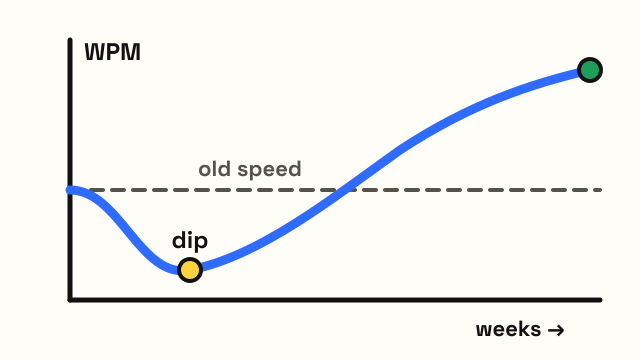
Most people who switch from QWERTY to Colemak or Dvorak can type usable text within a few weeks of daily practice, but getting back to their old speed usually takes one to several months. Those are commonly reported ranges, not guarantees. Published accounts run from about three weeks to a full year, and the official Colemak site doesn't give a figure at all. How long it takes you depends mostly on how fast you type now, how much you practice, and whether you keep using QWERTY at the same time.
How long does it take to switch keyboard layouts?
It helps to split the switch into stages, because each one feels very different. The ranges below are the ones switchers commonly report for daily practice of 15 to 30 minutes. Colemak tends to sit at the shorter end and Dvorak at the longer end, because Dvorak moves more keys.
| Stage | What it feels like | Commonly reported time |
|---|---|---|
| Learning the keys | You know where every letter is but still think about each one | 1–2 weeks |
| Usable speed (about 20–30 WPM) | Slow but good enough for chat and short emails | 2–6 weeks |
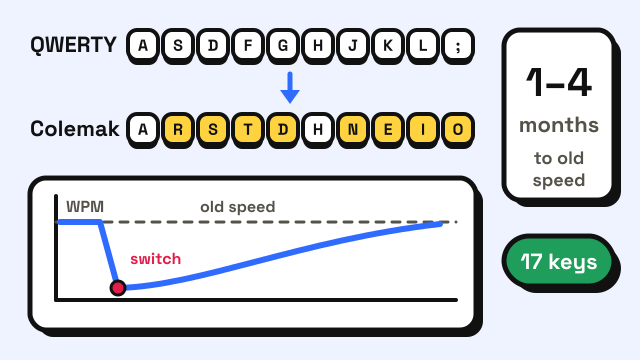
| Back to your old QWERTY speed | Typing feels automatic again | 1–4 months |
| Faster than before (if it happens) | Small gains, mainly in comfort | Several months or never |
A typist who was at 40 WPM on QWERTY has less ground to recover than one who was at 100 WPM, so the climb back is often shorter in weeks, even if the effort per week is the same. Fast typists also notice the drop more: going from 90 WPM to 15 WPM is a bigger shock than going from 35 to 15.
Is Colemak faster to learn than Dvorak?
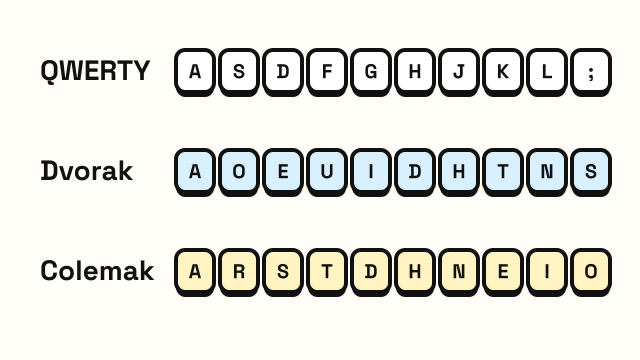
For people who already know QWERTY, Colemak is usually quicker. It changes 17 keys and keeps Z, X, C and V where they are, so copy, paste, cut and undo stay under the same fingers. Dvorak rearranges nearly every letter and most punctuation, and moves those shortcut keys too.
That difference shows up in the first weeks. On Colemak, many common words such as "a", "we" and "can" still use some familiar keys. On Dvorak, almost everything is new. If you've never learned to touch type at all, the gap matters much less, because you're building every finger habit from zero either way. Our QWERTY vs Dvorak vs Colemak guide covers the layouts themselves in more detail.
What did the old Dvorak studies find?
The switching question has been argued about since the 1940s, and the early studies are often quoted without their caveats.
A US Navy experiment in the 1940s retrained a small group of typists on Dvorak keyboards for two hours a day and was later cited as proof that the retraining cost paid for itself within days. Economists Stan Liebowitz and Stephen Margolis reviewed it in their 1990 paper "The Fable of the Keys" and questioned how the study was run and reported.
They gave more weight to a 1956 study by Earle Strong for the US General Services Administration. Ten government typists were retrained on Dvorak, and a second group of QWERTY typists was given further training on QWERTY. The Dvorak group improved more slowly with extra training than the QWERTY group did, and the study is usually credited with ending official interest in switching.
The same paper describes later studies, including one from 1978 at Oregon State University in which typists were back to about 97.6% of their old QWERTY speed after 100 hours of training. One hundred hours is roughly three months at an hour a day, which fits the ranges people still report today. Liebowitz and Margolis concluded there was little evidence that Dvorak is clearly better than QWERTY once you count the time it takes to switch.
These studies used typewriters and small groups, so treat them as history rather than a precise forecast. The main lesson still holds: switching costs real hours, and the payoff in speed is uncertain.
Why do some people switch back to QWERTY?
A lot of people start a layout switch and quietly return to QWERTY. The usual reasons are practical, not about the layout itself:
- The slow period is too long. Typing at a fraction of your normal speed for weeks is hard when you write for work.
- Two layouts interfere. Using QWERTY on a work laptop and Colemak at home can blur both. Some people manage two layouts well; many find one of them slips.
- Shared and locked computers. Work machines, school labs, kiosks and other people's computers will almost always be QWERTY.
- Phones. Most people keep QWERTY on their phone, so their thumbs never switch.
- Shortcuts and games. Apps and games often expect keys in QWERTY positions. Colemak avoids most of the shortcut problem; Dvorak doesn't.
- Typing tests for jobs. If you need to pass a timed test, it will likely be on a QWERTY machine. See typing speed for jobs for what employers ask for.
People who stick with a new layout often say comfort was the reason, not raw speed. If your goal is a higher WPM number, better technique on QWERTY is usually the shorter route, and our guide on how to type faster is a better place to start.
How can you make the switch faster?
You can't skip the learning, but you can avoid wasting time.
- Pick one layout and commit. Switching between candidates resets your progress.
- Decide between cold turkey and gradual. Going cold turkey, where you use only the new layout, is faster but painful. Gradual methods such as Tarmak move a few keys at a time toward Colemak, so you keep working speed while you learn.
- Practice daily in short sessions. Fifteen to thirty minutes a day beats two hours once a week, the same as when you first learn to touch type.
- Don't look at the keys. The printed letters are wrong now, which forces you to rely on your fingers. Our tips on how to stop looking at the keyboard help here.
- Aim for accuracy first. Fixing errors costs more time than typing slowly. See how to improve typing accuracy.
- Track your progress. Take the same 1-minute typing test every few days and write down your WPM. Seeing the line climb helps on slow days.
Before you start, check which layout your computer is actually using. Press a few letter keys in the keyboard tester, which detects QWERTY, AZERTY, QWERTZ, Dvorak and Colemak from the keys you press. Note that the typing lessons on this site teach the QWERTY layout.
Is switching worth it?
It can be, if you type for many hours a day on your own computer and care about comfort, or if you're learning to touch type from scratch anyway. It's harder to justify if you already type comfortably at a good speed, move between many computers, or mainly want a better score on a job test. A useful test is to ask whether you'd still switch if your top speed never went above your current one. If the answer is yes, the months of practice are more likely to feel worth it.
Frequently asked questions
How long does it take to learn Colemak?
Most people report learning the key positions in one to two weeks and reaching a usable speed in two to six weeks of daily practice. Matching an old QWERTY speed commonly takes one to a few months, and longer for very fast typists.
How long does it take to learn Dvorak?
Usually a bit longer than Colemak, because nearly every letter key moves. Older studies found typists needed roughly 100 hours of practice to get close to their old QWERTY speed.
Will I forget QWERTY if I switch?
Many people lose some QWERTY speed during the switch, especially in the first months. Some keep both layouts with regular practice on each, but expect at least one to be slower than before.
Can I switch layouts without buying a new keyboard?
Yes. Colemak and Dvorak are software settings in your operating system. Your keycaps will show the old letters, which many switchers find helps them stop looking down.
Sources
- Liebowitz, S. J., & Margolis, S. E. (1990). The Fable of the Keys. Journal of Law and Economics, 33(1), 1–25 (reviews the 1940s Navy study, Strong's 1956 GSA study and later retraining studies).
- SSD Nodes. How long does it take to learn Colemak? (summary of switcher reports, from about three weeks to a year).