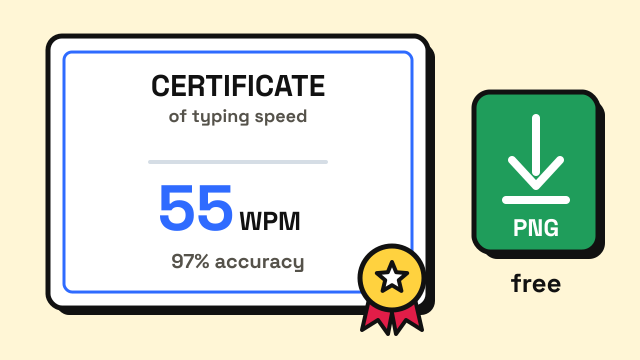
You can get a free typing certificate online in about five minutes: take a timed typing test, type your name, and download the result as an image. On EnjoyTyping that means a 1, 3 or 5 minute test followed by the typing certificate page, with no account and no fee. What a free certificate cannot do is prove who took the test. It is self-issued, so it works well as evidence for your own progress or an informal application, but it does not replace a proctored test when an employer or government agency asks for one. This guide explains the difference, the steps, and how to present the result.
What is a typing certificate?
A typing certificate is a document that records a typing speed, usually in words per minute (WPM), together with accuracy and the date of the test. They come in two broad kinds:
- Self-issued certificates. You take an online test on your own, and the site turns your result into a printable page or image. Most free certificates are this kind. Nobody watches the test or checks your identity.
- Proctored certificates. Someone supervises the test, in person or over video, and the testing organization confirms the result. These usually cost money and are the kind that formal hiring rules refer to.
Both can show the same number. The difference is how much the reader can trust that the number belongs to you.
When is a free typing certificate accepted?
It depends entirely on who is asking. Many private employers never ask for a certificate at all and simply run their own test during hiring. Public employers are more likely to write the rule down.
| Situation | Is a free, unproctored certificate enough? |
|---|---|
| Tracking your own progress or a class goal | Yes, that is what it is best for |
| Private job listing that says "typing 40+ WPM" | Often useful as supporting evidence; the employer may still test you |
| Staffing agency or data entry client | Usually they run their own test, so expect to retype |
| US federal clerical jobs | Applicants can usually self-certify, but the agency may test you to verify |
| California state jobs that require a typing certificate | No, the test must be proctored and five minutes long |
Two published rules show where the line sits.
US federal jobs. For federal clerk-typist and similar positions, the standard is 40 WPM based on a five-minute sample with three or fewer errors (OPM). Agency job materials that apply this standard state that applicants may meet it by self-certifying their proficiency or by presenting a certificate from an organization authorized to issue one, and that selecting officials may verify self-certified applicants with a performance test (Bureau of Indian Education). A free certificate is not required here, but practising until you can honestly meet the bar is.
California state jobs. CalHR says departments honor typing certificates issued within the last four years from a five-minute test with at least 40 WPM, and the test must be proctored either virtually or in person. Certificates from unproctored tests or tests shorter than five minutes are not accepted (CalCareers). A free online certificate does not qualify, though it is still a good way to check you are ready before paying for a proctored one.
The pattern is the same for both: the number they want is not high, but they care about the length of the test and about knowing who took it.
How to get a free typing certificate on EnjoyTyping
The whole process happens in your browser, and nothing about your name or result is uploaded.
- Take a timed test. Start with the 1 minute typing test, or choose the 3 minute or 5 minute test. The 30 second test is not offered on the certificate, because a result that short says little about sustained speed.
- Pick a difficulty. Easy, Medium and Hard all work, and the difficulty appears on the certificate so a reader can see it.
- Open the certificate page. From the result screen, choose the certificate option, or go to the typing certificate page directly.
- Type your name and download the PNG. The image shows your net WPM, accuracy, raw speed, test length, difficulty and the date. You can print it, save it or attach it to an email.
The certificate states plainly that it is a self-reported result from a free online test. That honesty is deliberate: anyone reading it knows what it is, which makes the numbers more credible rather than less.
Which test should you use for a certificate?
Use the longest test you can manage, on text that looks like real writing.
| Test | Good for | Why |
|---|---|---|
| 1 minute | Quick check, sharing a milestone | Short tests are easier to score high on |
| 3 minutes | General applications | Steadier measure, and it also reports keystrokes per hour |
| 5 minutes | Job applications | Matches the length the federal and California standards use |
Medium or Hard difficulty is worth the drop in speed. Text with capitals, punctuation and longer words is closer to real office work, and anyone who knows typing tests will trust a Hard result more than an Easy one. If you want to understand how the score is worked out first, read how WPM is calculated.
How do you put typing speed on a resume?
A single line in the skills section usually does more than an attachment:
Typing: 55 WPM, 97% accuracy (5 minute test)
Keep the certificate ready in case someone asks for it, and follow a few simple rules:
- Give accuracy alongside speed. A listing that asks for 45 WPM at 95% accuracy is better answered by 50 WPM at 98% than by 65 WPM at 89%.
- Name the test length. It tells the reader your number is not a lucky 30 seconds.
- Use a recent result. If your speed has improved, retake the test and download a new certificate.
- Be ready to repeat it. If an employer tests you, your score should land close to what you claimed. Claiming a number you cannot reproduce costs more than a modest honest one.
For what different roles tend to ask for, see typing speed for jobs and is 60 WPM good.
How can you get a better result before you download one?
The certificate is only as good as the test behind it, so a week of focused practice is often worth more than a dozen retakes.
- Fix accuracy first. If you are below 95%, slow down. The guide on how to improve typing accuracy covers how.
- Drill your weak keys. The test result lists the keys you miss most. Practise them in the typing lessons.
- Build stamina at full length. Five minutes feels long if you only practise one-minute tests. Do a few full-length runs before the one you keep.
- Check your keyboard. A sticky or missed key quietly drags down your score. The keyboard tester shows every key press.
- Warm up. Two or three minutes of easy typing, or a round of Typing Challenge, before the test you plan to keep.
Frequently asked questions
Is a free typing certificate legitimate?
It is a genuine record of a test you took, but it is self-issued and not proctored, so it is not an official credential. Treat it as supporting evidence, and expect employers with formal rules to test you themselves.
Do employers accept online typing certificates?
Some private employers are happy to see one. Others ignore certificates and run their own test. California state jobs require a proctored five-minute test, so an unproctored online certificate does not count there.
How long is a typing certificate valid?
There is no universal expiry. California accepts certificates issued within the last four years. For a self-issued certificate, a recent date simply shows your current speed, so retake the test before you apply.
What WPM should my certificate show?
For clerical work, 40 WPM with high accuracy on a five-minute test meets the US federal and California standards. Admin, data entry and transcription roles often ask for more.
Sources
- US Office of Personnel Management. Group Coverage Qualification Standard for Clerical and Administrative Support Positions (40 WPM on a five-minute sample with three or fewer errors).
- Bureau of Indian Education. Qualification requirements for clerical positions (self-certification, certificates of proficiency and verification by performance test).
- California Department of Human Resources, CalCareers. Typing Certification Requirements.