A mechanical keyboard doesn't make most people type faster by itself. We're not aware of any controlled study showing that switching from a membrane keyboard to a mechanical one raises words per minute, and typing skill matters far more than the board. What the research does show is that key force and key travel affect how hard you press and how comfortable typing feels, and that very short, stiff keys can slow people down. So a mechanical keyboard can help if it fixes something your current board does badly, such as mushy keys, missed presses or dropped keys during fast rolls.
What is the difference between mechanical and membrane keyboards?
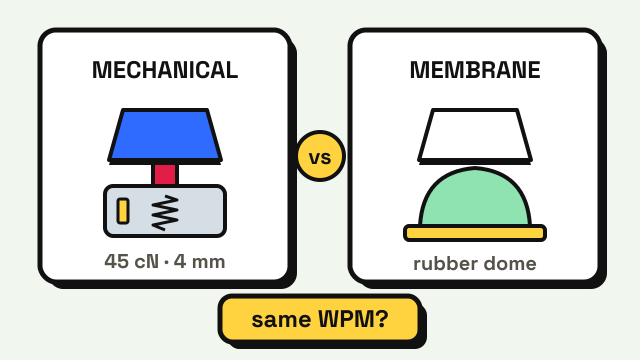
Both send the same key codes to your computer. The difference is under the keycap.
- Membrane keyboards use a rubber dome over a flexible circuit sheet. Pressing the key squashes the dome until it touches the circuit. Most office keyboards and laptops work this way.
- Mechanical keyboards give every key its own switch with a spring and metal contacts. The key registers partway down, at the actuation point, so you don't have to press it all the way.
Cherry's MX2A Red switch is a typical example. Cherry lists it at 45 cN operating force, 2.0 mm pre-travel (the point where the key registers) and 4.0 mm total travel. Other switches change those numbers, and add a bump or a click so you can feel the actuation point.
| Membrane (desktop) | Membrane (laptop, scissor) | Mechanical | |
|---|---|---|---|
| How a key registers | Rubber dome pressed onto a circuit sheet | Short dome under a scissor frame | Separate switch with spring and contacts |
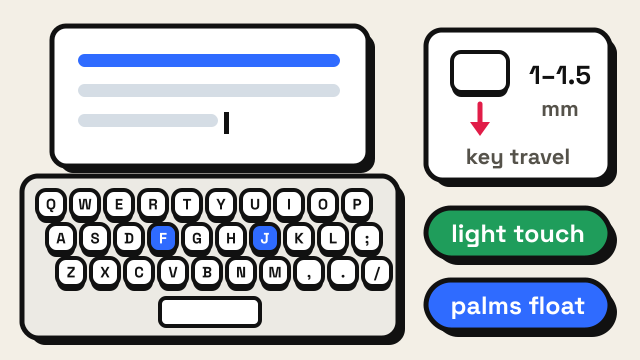
| Key travel | Commonly cited around 3–4 mm | Often about 1–1.5 mm | About 4 mm on common switches |
| Where it registers | Near the bottom | Near the bottom | Partway down, about 2 mm on many switches |
| Feel | Soft, varies as domes wear | Short and firm | Linear, tactile bump or click, by switch |
| Simultaneous keys | Often limited | Often limited | Often full rollover |
Does a mechanical keyboard increase typing speed?
Not reliably. Speed comes from knowing where each key is, using the same finger for each key and making few mistakes. None of that is in the keyboard. The guide on how to type faster covers the habits that actually move the number.
There are two smaller ways a keyboard can affect your score:
- Missed or doubled keys. If a worn membrane board sometimes drops a letter, or a cheap board registers a key twice, you lose time fixing errors. Any keyboard that registers every press cleanly fixes that, mechanical or not.
- Dropped keys during rollover. Fast typists often press the next key before letting go of the last one. A large study of 136 million keystrokes from Aalto University found this rollover typing is surprisingly common. Many mechanical boards register every key you hold at once, while some membrane boards drop keys when several are down together. That's a separate problem called keyboard ghosting, and it mostly matters at high speeds.
Both are about accuracy, not raw speed. The same Aalto study found that faster typists make fewer mistakes, which is why fixing errors tends to pay off more than chasing a faster board. See how to improve typing accuracy for that side.
What does research say about key force and travel?
The lab studies don't compare "mechanical" and "membrane" as categories. They test the properties that switches differ on.
Key force. Rempel and colleagues had ten experienced typists use three keyboards with make forces of 0.34, 0.47 and 1.02 N, published in Ergonomics in 1997. Going from 0.47 to 1.02 N raised the force people applied by about 40% and finger flexor muscle activity by about 20%, while the two lighter boards were no different from each other. The authors recommended switches at 0.47 N or below. For comparison, 45 cN is 0.45 N, so many common mechanical switches sit in that lighter range, and so do many membrane boards.
Key travel. In the "Going Short" study, Coppola and colleagues had 20 people type on four commercial laptop-style keyboards with 0.55 mm, 1.3 mm and 1.6 mm travel. The device with 0.55 mm travel and a dome switch was the outlier: typing speed was about 8% slower, typing force about 12% higher, and discomfort roughly twice as high as on the other three. Because that device was both the shortest and had a different switch, the study can't say which of the two caused it.
Together, the evidence suggests very short or heavy keys can hurt, while ordinary keys are fine. It doesn't show that a 4 mm mechanical switch beats a good 3 mm membrane key.
Why do people feel faster on a mechanical keyboard?
Many people say they type faster after switching, and the feeling is real even if the stopwatch disagrees. Some common reasons:
- Clear feedback. A tactile bump or click tells you the key registered, so some typists stop pressing all the way down. Whether that actually saves time varies from person to person.
- Novelty and attention. A new keyboard makes you pay attention to typing for a while, and focused practice improves anyone's score.
- Comparison with a bad board. If the old keyboard was a worn office board with sticky keys, almost any good keyboard will feel faster.
Comfort and enjoyment are good reasons to buy one. They just aren't a measured speed gain.
Which switch type is best for typing?
There's no proven fastest switch. The three main families feel very different, and preference is personal.
| Switch type | Feel | Sound | Often chosen for |
|---|---|---|---|
| Linear (for example, red switches) | Smooth all the way down | Quiet to moderate | Gaming, light fast presses |
| Tactile (for example, brown switches) | Small bump at actuation | Moderate | Typing, feeling each keypress |
| Clicky (for example, blue switches) | Bump plus a sharp click | Loud | Typing alone, strong feedback |
If you share a room or an office, a linear or tactile switch is usually the polite choice. If you press hard and your fingers tire, look at lighter switches, in line with the force research above. Size is a separate question from switch type; keyboard sizes explained compares full-size, TKL and 60% boards.
How to test whether a new keyboard makes you faster
Don't judge a keyboard on day one; most people type a little slower on a new board for a few days. Use a fair before-and-after test:
- Get a baseline on your old keyboard. Take three 1-minute typing tests and write down the average WPM and accuracy, or one 3-minute test for a steadier number.
- Check the new keyboard works. Open the keyboard tester, press every key once, then hold several letters together to check rollover.
- Use it normally for a week. Type your usual work on it. Don't judge it yet.
- Test again the same way. Same test length, same time of day, three attempts, average them.
- Compare WPM and accuracy together. A small rise in speed with lower accuracy isn't a win. Differences of a few WPM are within normal day-to-day variation.
If your scores are about the same, the keyboard is a comfort choice, which is a fine reason to keep it. If you're still learning, the typing lessons will do more for your speed than any switch, and your setup matters too: the typing posture guide covers desk height and wrist position.
Frequently asked questions
Do professional typists use mechanical keyboards?
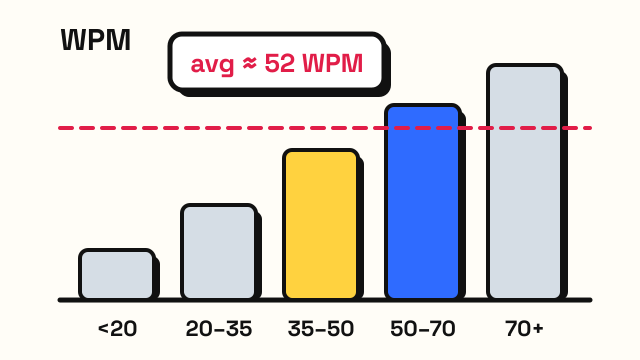
Some do and some don't. Many fast typists in online typing communities use mechanical boards, but plenty of people type quickly on laptops and office keyboards. Skill, not the keyboard type, is what separates fast typists from average ones; see average typing speed for typical numbers.
Are mechanical keyboards better for your hands?
There's no clear evidence that mechanical switches as a category are better or worse for your hands. Research suggests lighter key force reduces the force you apply and muscle activity, and that very short, stiff keys can increase discomfort. A light switch and good posture matter more than the mechanism.
How long does it take to get used to a mechanical keyboard?
Most people adjust within a few days to a week of normal use. That's why it's best to wait a week before comparing typing test scores between your old and new keyboards.
Sources
- Cherry. MX2A Red (linear switch, 45 cN operating force, 2.0 mm pre-travel, 4.0 mm total travel).
- Rempel, D., Serina, E., Klinenberg, E., et al. (1997). The effect of keyboard keyswitch make force on applied force and finger flexor muscle activity. Ergonomics, 40(8), 800–808 (ten typists; 0.34, 0.47 and 1.02 N; about 40% more applied force and 20% more muscle activity at 1.02 N).
- Coppola, S., Dixon, P., Hu, B., Lin, M. and Dennerlein, J. Going Short: The Effects of Short-Travel Key Switches on Typing Performance, Typing Force, Forearm Muscle Activity, and User Experience. CDC Stacks author manuscript (20 participants; 0.55 mm dome-switch device about 8% slower typing, 12% higher force, about twice the discomfort).
- Dhakal, V., Feit, A. M., Kristensson, P. O. and Oulasvirta, A. (2018). Observations on Typing from 136 Million Keystrokes. CHI 2018 (rollover typing is common; faster typists make fewer mistakes).