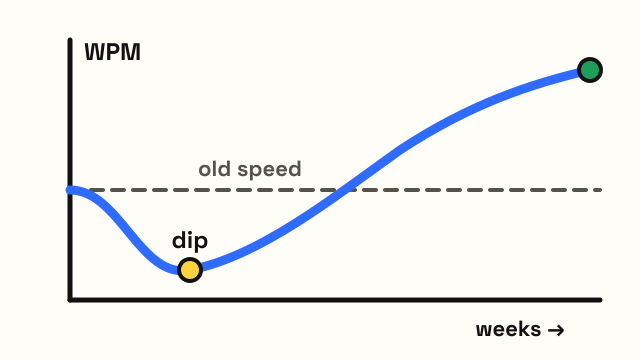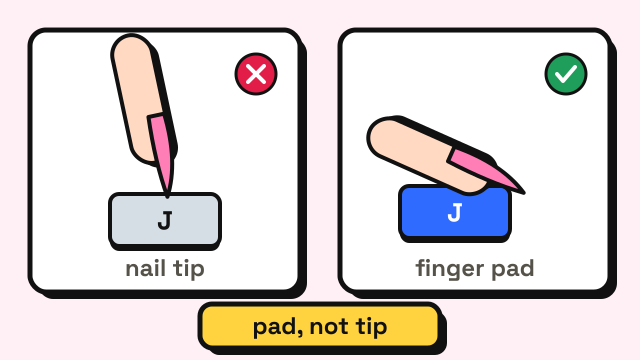
To type fast with long nails, hit the keys with the pads of your fingers instead of the tips, let your fingers lie a little flatter than the classic curled position, and use a keyboard with low, flat keys and a light press. Expect to lose some speed and accuracy for the first week or two after a new set, then rebuild it the usual way: slow, clean practice first, speed later. Very long nails do make typing harder, and research backs that up, but at moderate lengths most people get close to their normal speed once they adjust their technique.
Do long nails actually slow down your typing?
Yes, past a certain length. In a study published in the Journal of Hand Therapy, researchers tested women wearing artificial nails of different lengths and measured finger movement, grip strength, finger dexterity and typing. With nails reaching 2 cm past the fingertip, typing speed dropped, and at 1 and 2 cm finger range of motion and dexterity also got worse. The authors explained it this way: long nails stop the finger joints from bending fully, especially the knuckles where the fingers meet the hand (Stegink Jansen, Patterson and Viegas, 2000). For the best hand function, they suggested keeping nails at about 0.5 cm.
A 2024 study of phone use found the same kind of effect on touchscreens. Nails 10 mm long cut the range of finger angles people could use by 57% and reduced how efficiently they hit on-screen targets by 24%, compared with short nails (Coutrix and Prost, 2024).
Long nails change how your finger meets the key, so the fix is to change your technique to match.
| Nail length past the fingertip | What usually happens | What to change |
|---|---|---|
| Short (a few mm) | Normal touch typing works | Nothing; keep curled fingers |
| Medium (about 5 mm) | Tips start to click on keys; a few more misses | Type with pads, flatten fingers slightly |
| Long (1 cm) | Curled fingers no longer fit; reaches feel uncertain | Flatter hand, low flat keys, slow practice |
| Very long (2 cm+) | Speed drops, as the 2000 study found | Expect a real slowdown; pick accuracy over speed |
The middle rows are general guidance, not measured cut-offs.
How do you type with long nails?
1. Strike with the pad, not the tip
Touch typing usually teaches curled fingers that press with the fingertip. With long nails, that puts the nail on the key first, so it clicks, slides off or hits the next key. Press with the soft pad of your finger instead, just behind where the nail starts.
2. Flatten your fingers a little
To get the pad onto the key, open your fingers slightly so they slope down toward the keyboard rather than standing up. Keep your wrist straight and floating, not bent up or resting hard on the desk. A slightly flatter hand is fine. Bending your wrist back to make room for your nails is not, because that strains the wrist. Our typing posture guide shows a neutral wrist position.
3. Keep the same home position
Long nails make it tempting to hover and look down. Don't. Rest your fingers on the home row keys (A S D F and J K L ;), feel the bumps on F and J with your index pads, and come back there after every reach. The same finger should press the same key every time. The touch typing finger chart shows which finger owns each key.
4. Press lightly and let go fast
Press just hard enough for the key to register, then lift. Pressing hard pushes the nail into the key and can catch the edge of the next one.
5. Watch the reaches, not the home row
The keys that cause trouble are usually the long reaches: the number row, Q, P and Y on the top row, and Z, X, B and N on the bottom row. That is where a nail is most likely to clip the wrong key. Slow down for these and keep the finger flatter as it stretches.
What keyboard is best for long nails?
You don't need a special keyboard, but some designs are much easier with long nails than others.
- Low-profile keys. Laptop-style keyboards and slim "chiclet" keyboards have short keys with small gaps around them. Your pad can press the key without your nail diving into the gap between keys.
- Flat or slightly scooped keycaps. Keys with a flat top give your pad a wide area to land on. Tall, deeply curved keycaps can feel awkward because the nail hits the raised edge first.
- Light switches. A key that needs less force to press means less pressure on the nail and less chance of it bending or snagging. If you use a mechanical keyboard, lighter linear switches often work better than heavy ones. Our guide on mechanical keyboards and typing speed explains how switches differ.
If some presses don't seem to register, the keyboard tester lights up each key as you press it, so you can tell whether the problem is your technique or the keyboard.
Does nail shape matter?
It can. Rounded shapes and shorter tapered shapes tend to sit above the keys more cleanly. Long, sharply pointed or square shapes are more likely to catch on the edge of a key or the gap next to it. This is practical experience, not something a study has measured.
Whatever shape you choose, keep the edges smooth. A rough edge snags on keys and breaks more easily. Dermatologists recommend filing nails to keep them shaped and free of snags, and not using them as tools (American Academy of Dermatology).
How to get your speed back after a new set of nails
The first few days after a new or longer set are when you lose the most speed. Use them to rebuild accuracy, not to chase your old score.
- Take a baseline. Do the 1 minute typing test three times and note your accuracy and the keys you miss most. With new nails, these are often pinky keys and long reaches.
- Slow down to 97% accuracy. Type at the pace where you make almost no mistakes. Our guide on how to improve typing accuracy explains why speed follows accuracy.
- Run the home row lesson again. The home row lesson is a quick way to retrain where your pads land. Then move on through the typing lessons for the rows that give you trouble.
- Add a game for rhythm. In Typing Race, a wrong letter stops your runner until you delete it, which rewards clean keystrokes.
- Retest after a week. Most people find their accuracy comes back first and their speed follows.
A short warm-up before a test also helps, because the first minute with new nails is usually the clumsiest.
Is typing on a phone with long nails different?
Yes. A phone screen reacts to the skin of your finger, not your nail, so a nail that touches first does nothing. Tilt your finger flatter so the pad touches the glass, or tap with the side of your thumb. The mobile typing test keeps phone results separate from desktop ones, and our guide on mobile typing speed has more phone tips.
Frequently asked questions
What nail length is best for typing?
The shorter, the easier, but you don't have to cut them off. In the 2000 hand therapy study, nails 2 cm past the fingertip slowed typing, and the authors suggested about 0.5 cm for the best hand function. Many people type comfortably with nails a few millimeters past the fingertip once they switch to using their pads.
Can you touch type with acrylic nails?
Yes. Acrylic or gel nails tend to click more on the keys, but the technique is the same: press with your pads, flatten your fingers slightly and keep your eyes on the screen.
Why do I make more typos with long nails?
Usually because the nail touches the key before your pad does, so the finger slides onto the next key, or because you've started looking down at your hands. Slowing down, pressing with the pad and returning to the home row after every reach fixes most of it.
How long does it take to get used to typing with long nails?
It varies. The biggest change is usually in the first few days after a new set, and regular practice brings most people back toward their usual speed. Track your accuracy on a typing test to see your own trend.
Sources
- Stegink Jansen, C. W., Patterson, R. and Viegas, S. F. (2000). Effects of fingernail length on finger and hand performance. Journal of Hand Therapy, 13(3), 211–217.
- Coutrix, C. and Prost, C. (2024). Impact of Fingernails Length on Mobile Tactile Interaction. Proceedings of the 2024 CHI Conference on Human Factors in Computing Systems.
- American Academy of Dermatology. 11 dermatologists' tips for healthy nails.