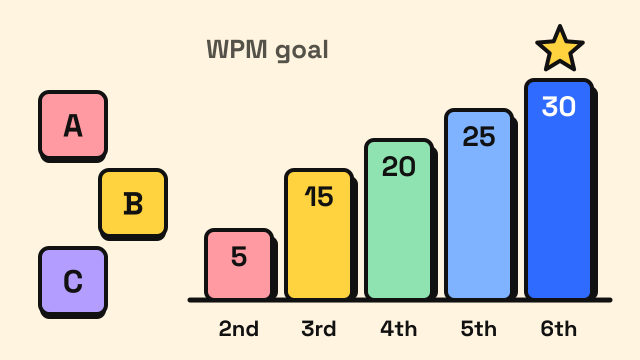
A realistic typing speed for kids rises from about 5 words per minute (WPM) in 2nd grade to roughly 15 WPM in 3rd grade, 20 WPM in 4th, 25 WPM in 5th and around 30 WPM by 6th grade, with accuracy of 85–90% or better. There is no national WPM standard in the United States. These numbers are the goals schools and typing programs most often use, and one school district publishes almost exactly this ladder for grades 2 to 4. The Common Core writing standards describe the target differently: by how many pages a child can type in one sitting. This guide puts both side by side and explains how to help a child reach them.
Is there an official typing speed for each grade?
No. The Common Core State Standards, which most US states adopted in some form, mention keyboarding in the writing standard numbered 6 for each grade, but they never give a WPM figure. Instead they describe volume:
- Grade 3: with guidance and support from adults, use technology to produce and publish writing "using keyboarding skills".
- Grade 4: demonstrate sufficient command of keyboarding skills to type a minimum of one page in a single sitting.
- Grade 5: the same, with a minimum of two pages.
- Grade 6: the same, with a minimum of three pages.
Speed goals come from school districts and curriculum providers. Arlington ISD in Texas, for example, sets 5 WPM for grade 2, 15 WPM for grade 3 and 20 WPM for grade 4, each at 80–100% accuracy (Arlington ISD). Other districts and typing programs publish similar ladders, sometimes 5 WPM lower per grade, so treat any single chart as a guide rather than a rule.
Typing speed goals by grade
The table combines the published Common Core expectations with the WPM ranges most commonly cited by schools and typing programs. The lower end of each range is a fair goal for a child who started recently. The upper end suits a child who has had regular lessons.
| Grade | Typical age | WPM goal | Accuracy goal | Common Core writing standard |
|---|---|---|---|---|
| K–1 | 5–7 | No speed goal | Finding letters | Not specified |
| 2 | 7–8 | About 5 | 80%+ | Not specified |
| 3 | 8–9 | 10–15 | 80–90% | Keyboarding with adult support |
| 4 | 9–10 | 15–20 | 85–90% | One page in a single sitting |
| 5 | 10–11 | 20–25 | 90%+ | Two pages in a single sitting |
| 6 | 11–12 | 25–30 | 90%+ | Three pages in a single sitting |
| 7–8 | 12–14 | 30–35+ | 90%+ | Not specified |
To see why the WPM goals and the page counts fit together, do the arithmetic. A typed, double-spaced page is often reckoned at around 250 words. At 15 WPM that is about 17 minutes of steady typing. At 20 WPM it is about 12 minutes. A 4th grader below 10 WPM would need close to half an hour of typing for one page before thinking about what to write, which is why schools push for speed in grades 3 and 4.
How fast should a child type compared with handwriting?
A useful personal benchmark is the child's own handwriting speed. A 2005 literature review on keyboarding for students with handwriting difficulties concluded that students should be able to type at least as fast as they handwrite before typing is a real help to them, and that touch typing is the method to aim for (Freeman, MacKinnon and Miller, 2005). The same review suggested upper elementary school as a reasonable age to start formal instruction.
Young children often handwrite faster than they type, especially in grades 2 to 4. That is normal. The crossover point usually comes once a child stops searching for each key, which is why learning letter positions matters more than raw speed in the early grades.
When should kids start learning to type?
Most programs introduce the keyboard in kindergarten or 1st grade as a way to find letters, and begin structured touch typing around 2nd or 3rd grade. A few things make the start smoother:
- Hands big enough to reach. Small hands struggle to rest on the home row of a full-size keyboard. If a child cannot comfortably reach from F to R and from J to U, wait a little or use a smaller keyboard.
- Reading and spelling in place. Typing a word is much easier when the child can spell it without help. That is why spelling games and typing practice work well together.
- Short, frequent sessions. Arlington ISD suggests 20 minutes a day, four days a week, for four weeks in 3rd grade. For younger children, 10 to 15 minutes is usually plenty.
Start with the home row keys and the correct finger for each key, even if it feels slow. A child who learns to type with two fingers while looking at the keys often hits a ceiling early. Our guide on how to stop looking at the keyboard explains how to break that habit.
How much practice does it take?
The 2005 review estimated that students need roughly 25 to 30 hours of keyboarding instruction to build a useful skill. Spread over a school year, that is a little more than 10 minutes a day on school days.
A simple weekly routine for a child in grades 3 to 5:
| Day | Activity | Time |
|---|---|---|
| Monday | One level of typing lessons | 10–15 min |
| Tuesday | Listen and Type spelling practice | 10 min |
| Wednesday | Repeat Monday's lesson, aiming for higher accuracy | 10–15 min |
| Thursday | Monster Typing Game | 10 min |
| Friday | One 30 second typing test or 1 minute test, recorded on a chart | 5 min |
Games keep motivation up, but lessons are where finger placement is learned. For more options, see the best typing games for kids.
How do you measure a child's typing speed fairly?
Children's scores jump around more than adults' do, so one result says little.
- Use a short test. Thirty seconds or one minute is enough for a young child. Longer tests mostly measure patience.
- Pick easy text. Common, short words give a fair reading. A passage full of long or unfamiliar words measures spelling, not typing.
- Look at accuracy first. If accuracy is below 85%, ask the child to slow down next time. Speed built on guessing does not last.
- Take the middle of three. Run three tests on the same day and keep the middle score.
- Compare with last month, not with classmates. A child going from 8 to 12 WPM is making good progress, whatever the grade chart says.
The typing test shows WPM, accuracy and the keys missed most, which tells you which letters to practise next. If you want to understand the number itself, our guide on how WPM is calculated explains it in plain terms.
What if my child is behind the goals?
Being a grade level behind on a typing chart is common and rarely a concern on its own. Check three things before adding more practice time:
- Posture and setup. A chair that is too low or a keyboard too far away slows anyone down. The typing posture guide shows a setup that works for children too.
- Finger method. If the child still uses one finger per hand, more practice will only make that habit faster. Go back to the first lesson level and rebuild.
- Spelling. Many slow typists are really slow spellers. Spelling practice through typing helps both at once.
Progress usually comes in steps. It is normal for speed to stall for a few weeks while a child learns the top and bottom rows, then climb again. The guide on how long it takes to learn touch typing describes that pattern.
Frequently asked questions
What is a good typing speed for a 10 year old?
Most 10 year olds are in 4th or 5th grade, where common goals are 15 to 25 WPM with about 90% accuracy. A child who touch types and practises regularly may be faster.
What WPM should a 3rd grader type?
Common goals for 3rd grade are 10 to 15 WPM. Arlington ISD, for example, sets 15 WPM at 80–100% accuracy. Accuracy and correct finger placement matter more than speed at this stage.
Does Common Core require a typing speed?
No. Common Core describes keyboarding by volume instead: typing at least one page in a single sitting in grade 4, two pages in grade 5 and three pages in grade 6. Speed targets come from districts and typing programs.
How fast do adults type compared with kids?
Adults are commonly said to average around 40 WPM, so a middle schooler typing 30 to 35 WPM is already close. Our guide to average typing speed has the adult ranges.
Sources
- Common Core State Standards Initiative. English Language Arts Standards, Writing, Grades 3–6, standard 6 (W.3.6, W.4.6, W.5.6 and W.6.6 keyboarding expectations).
- Arlington Independent School District. Keyboarding Guidelines (grade 2: 5 WPM, grade 3: 15 WPM, grade 4: 20 WPM, at 80–100% accuracy).
- Freeman, A. R., MacKinnon, J. R. and Miller, L. T. (2005). Keyboarding for Students with Handwriting Problems: A Literature Review. Physical & Occupational Therapy in Pediatrics, 25(1–2), 119–147.